Windows Research Kernel @ HPI
The Windows Research Kernel (WRK) comprising the source code of Windows Server 2003 Enterprise Edition was released in summer 2006. The WRK is provided to faculties within the shared source program of Microsoft. This site collects posts related to work on Windows source code.
WRK@HPI Team: Alexander Schmidt, Michael Schöbel
Posts
Last Post
Hi folks,
with this very last article, I would like to inform you that this blog will be closed at the end of June. This decision was made for two reasons. (1) The Windows Research Kernel was a great step from Microsoft towards academia. Together with its license the WRK enabled universities to use the Windows source code for their teaching efforts. Unfortunately, there is no news about next versions of the WRK, which makes it hard to study and teach new trends in hardware design, such as multi-core architectures, hybrid systems, and memory hierarchies, in the context of the Windows operating system and to share those insights via this blog. (2) With the submission of my PhD thesis, my affiliation with the HPI will come to a close at the end of the year.
Nevertheless, we are going to maintain a static version of all the blog posts submitted so far.
Cheers,
Alex
How To: Import VMs into Hyper-V
We use Hyper-V to run some of our WRK-related experiments. In order to keep management simple, I created a virtual machine that contains all the setup for those experiments. After creating that image, I used Hyper-V (running on Windows Server 2008 R2) to export this machine to have the template image ready at hand. Once this was done, I thought I would be able to import that image multilple times so that would have enough instances for running our experiment (30 in our case). However, when I imported the second instance, Hyper-V failed to import the template since the VHD file already existed. In this post I will explain how you can easily import multiple virtual machines from one single template image using PowerShell.
WRK Compatibility With Windows Server 2003 SP2
The deployment of Windows Server 2008 R2 Hyper-V based virtual machines to facilitate our operating system course assignments has brought up the issue that virtual machines have to run at least Windows Server 2003 SP2. Since the WRK documentation says that Windows Server 2003 SP1 is needed to run the kernel, the question remains whether the application binary interface (ABI) of those two versions are compatible. As others indicated (thanks for your comments :)) and evaluated on our server, the WRK appears to be able to run on Windows Server 2003 SP2. Nevertheless, I wanted to examine if at least the user-kernel mode ABI is compatible, for which I will give an answer in this post.
How To: Debug the WRK on Mac OS X Using VMware Fusion
Debugging the WRK on Mac OS requires two virtual machines (VM): the
WRK VM, which will be used to debug the kernel, and the debugger VM,
which hosts the kernel debugger. Both VMs will use their serial port
to communicate with each other. In a previous
post, we have shown for VirtualBox how to connect both serial
ports over a named pipe. Now, we are going to describe how to
configure VMware Fusion 3.0 virtual machines to accomplish the same
goal.
Read more
Browse Through the WRK Sources
In a recent post, we introduced PXR, a cross-referencing source code documentation compiler. If you are interested in how the results look like and how it feels to interactively browse through the sources, the generated HTML files are now available on Microsoft's Faculty Connection. We decided to publish these files in that way because we need to make sure that only eligible persons access the source code. Faculty Connection already provides this kind of service.
In the meantime, we are working on a release of the PXR sources, so that you can start building a documentation of your own projects.
WRK Works With Windows Server 2003 SP2
For a recent project, we are going to host a bunch of WRK virtual machines with Hyper-V on a Windows Server 2008 R2 server system. When setting up the first virtual machine, we figured out that Hyper-V is only capable of running Windows Server 2003 with Service Pack 2 conveniently. That is, with mouse and network support!
Since the WRK documentation says that the WRK should be deployed on a Windows Server 2003 (W2K3) SP1 system, we were not sure how to proceed. We finally decided to give it a try and the WRK boots in this environment and works-so far. We do not know, if there may be any compatibility issues between the W2K3 SP2 environment and requirements demanded by the WRK. To further investigate the issue, we will run a set of experiments to figure out, if the WRK continues to run smoothly with W2K3 SP2 and keep you posted.
If you have any contrary or supporting experiences in this regard, please feel free to let us know.
Introducing PXR: A Cross-Referencing Documentation Compiler
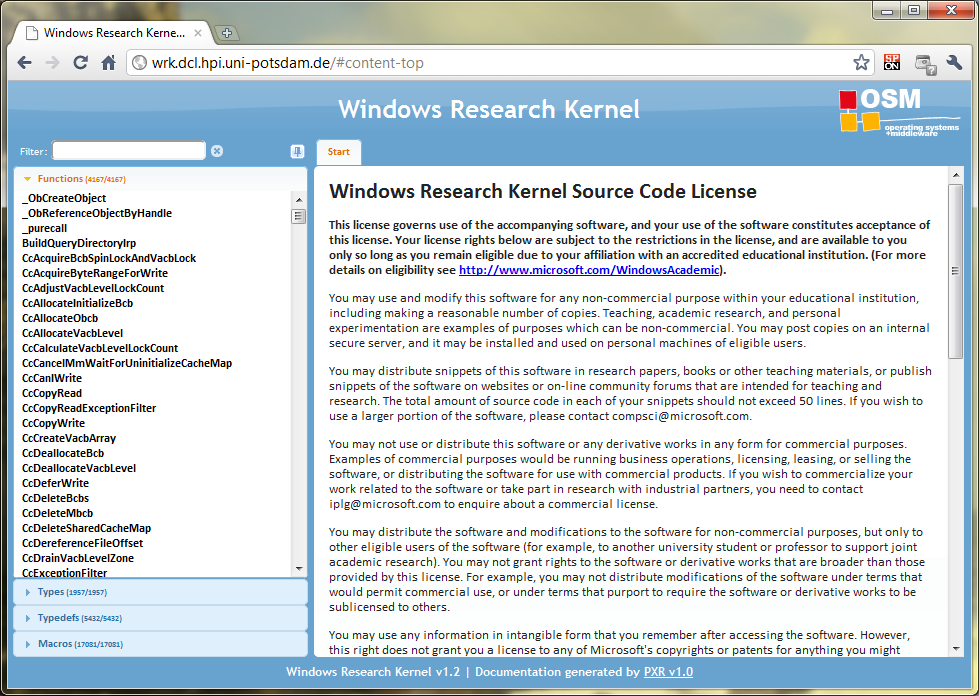
Quite some time ago, Michael posted an article about our filter for the Doxygen documentation compiler. While Doxygen is a great tool for documenting large source code repositories, we had some issues with the results that were generated. For example, we had several cases, where Doxygen linked to the prototype declaration of a function instead of its definition. We also wanted a Web site that leverages Web 2.0 capabilities such as AJAX to further enhance the user experience, which is why we decided to build our own documentation compiler: PXR. In this article, we want to briefly introduce PXR and to give you an impression of what it looks like:
Read more
Scalability Issues in CSRSS
One of our current topics is pushing the limits of operating systems. Inspired by Mark Russinovich's article Pushing the Limits of Windows: Processes and Threads, we built a theoretical model for the amount of threads that can be created on a given system and then tried to reach these limits. However, the practical evaluation was kind of tricky and we stumbled upon an issue within CSRSS, Windows' client server runtime subsystem.
How To: Boot the WRK in a Virtual Machine
In a previous post, we showed you how to debug the WRK on a Mac OS system using Sun's VirtualBox. However, in that post, I only concentrated on how to link both virtual machines but not on how to create a WRK-ready virtual machine (VM), because I thought that this task is well documented on the WRK DVD. Unfortunately, on the latest revision of the WRK DVD (verion 1.3, series F), this documentation is missing. In general, this is not a problem, as Microsoft provides a WRK-ready Virtual PC image on the DVD, where all the settings have been done already, but it is of no help, if you plan to use VirtualBox in your environment. In this article, we want to re-iterate over the steps necessary to run the WRK in your virtual machine.
Presenting at Windows Core Workshop 2010, Beijing, China
Taking place for the fourth time, the Microsoft Research Asia Windows Core Workshop brings together faculty from around the world and Microsoft kernel experts to provide information about and exchange experiences in Windows technologies for teaching operating systems.
As the WRK and CRK community is pretty active in the Asia/Pacific region, we are extremely proud to be invited to give a presentation about our experiences with the WRK here at HPI. Here is the abstract of Alexander's talk.
Presenting at SIGCSE 2010
As you may or may not know, here at HPI, we use the WRK pretty intense for teaching operating systems. Since the WRK has been released, we have developed a couple of programming projects, each dealing with a particular OS subject or principle. The goal behind those projects was to enable our students to use the WRK to experiment with certain parts of it and to experience implications of different design and implementation rationals.
However, when we started doing this, we ran into several problems, most of which are related to complexity of the WRK. First of all, we experienced that our students were not very familiar with the provided nmake-based build environment. Second, deploying the kernel onto a test system is way different than running a usual application. This also includes the debugging process. Finally, the complexity of the WRK requires students to thoroughly study the sources of the kernel prior to actually do some programming. While studying the WRK first is not the worst idea, it takes way too much time to understand each and every detail of the implementation. In many cases, it is however as sufficiently to understand only portions of it.
To persist our methodology, our experiences, our experiments, and the feedback our students gave us, we wrote a paper, which has been accepted for presentation at the 41st ACM Technical Symposium on Computer Science Education (SIGCSE 2010), in Milwaukee, WI, USA. If you are interested in our findings, please have a closer look on our paper -- Teaching Operating Systems - Windows Kernel Projects. We will also post the slides of the talk here anytime soon.
Numbered Queued Spinlocks in the WRK
In a recent post, we covered the implementation of in-stack queued spinlocks, the recommended method to use queued spinlocks in drivers. In this article, we would like to extend the discussion to a second class of queued spinlocks: numbered queued spinlocks. These well-known locks use per processor, pre-allocated memory to store the processor's queue item. In this article, we will give a short overview over the existing queued spinlocks in the WRK, how they are initialized and how they are used.
Queued Spinlocks in the WRK
A few days ago, we came up with a discussion on the advantages of queued spinlocks over normal spinlocks. The biggest advantage in our oppinion is that queued spinlocks guarantee a FIFO ordering among competing processors while normal spinlocks don't. In this article, we show the implementation of queued spinlocks in the WRK. We present the source code of the 64-bit version for two reasons: first, the 64-bit version contains the implementation in plain C and not in the Assembly language, and second, in the 32-bit version, queued spinlocks are implemented in the HAL, which is not available as source code. The rational behind the implementation remains however the same.
Windows 7 and Server 2008 R2 Kernel Changes (TechEd Europe 2009)
Michael and I got the chance to attend TechEd Europe 2009 in Berlin, where Mark Russinovich was giving a great talk about the changes within the Windows 7 and Server 2008 R2 kernels. And although this blog is about the WRK and its details, we thought it might still be valuable to stay up to date with current OSes.
Mark's talks can also be found on Web: Channel 9 talk.
For those who don't have the time for watching the whole 70 minute presentation, here is a summary of the changes:
Resolved: A Performance Issue in Windows Timer Management
Two years ago, I wrote an article about spurious timer table entries. Those entries occurred in the global timer table and resulted in unnecessarily scheduled DPCs. During a recent visit in Redmond, I had the chance to meet with one of the Windows kernel developers. By coincidence, he remembered my article and told me that with Windows 7 the issue has been fixed. Here is how they did it.
NtCreateThread - memory allocations in kernel mode
In this post we try to determine how much kernel memory is required when creating a new thread. This amount of memory is relevant for the upper bound of the number of possible threads in the system as investigated in detail by Mark Russinovich.
For a starting point we looked at the system service call
implementation of NtCreateThread and followed every
possible code path down to memory allocation functions such as
ExAllocatePoolWithTag.
WRK @ HPI First Hit on Bing
Well, it required us some work, but finally it pays off 🙂
At least on the US version of bing, our blog is the first entry on the result list. As Bing is sometimes strange and does not work properly if you do not set its locale to English (US), here is a screen shot to prove my claim:
(SINGLE_)LIST_ENTRY & CONTAINING_RECORD
Lists are a basic data structure in any operating system kernel, e.g. used for thread queue management. The WRK provides a set of struct definitions and list related functions/macros. In this post a short survey of these elements is given.
How To: Debug the WRK on Mac OS X Using VirtualBox
This article describes how to configure VirtualBox on a Mac OS X system that allows both developing and debugging the WRK at the same time.
Howto: Adding a new kernel module
The Windows Research Kernel contains multiple kernel modules, e.g.
for memory management or for the executive layer. Each module has its
own subdirectory in base/ntos. If you want to extend the
WRK it might be useful to collect all your new files in a new kernel
module. This post explains the necessary steps for adding a new kernel
module. Basically, all it takes is tweaking a few makefiles.
WRK at 2009 Asia Pacific Workshop
Recently, Microsoft Research Asia organized the 2009 Asia Pacific Windows Core Workshop, where universities presented what they are doing with the WRK in their lectures and research.
WRK System Service Calls Made Simple
Michael created an exhaustive tutorial on how to create a new system service call in the Windows Research Kernel in his HowTo series. An important part is to define the system service dispatch table that contains the new system call, otherwise no user mode application could use it. Creating this dispatch table requires modifying two assembly language files, sysstubs.asm and systable.asm, which in our opinion has proven error prone and tedious.
Therefore, we created a tool that generates the system service table automatically when the WRK is built. It is available as binary for x86 platforms and as sources. It can be downloaded from wrktools.codeplex.com.
SIGCSE 2009
Besides exploring the Windows Research Kernel for our own research purposes and posting our experience here on this blog, we also use the WRK for teaching operating systems concepts. One outcome of these efforts was for example the updated version of our Visual Studio 2008 solution file, that Michael posted recently.
Using Visual Studio with the Windows Research Kernel - 2008 Update
Alexander created a new version of the Visual Studio project files. Some makefiles were adapted, now double clicking entries in the "Error List" window will bring you directly to the source code location.
Just copy the files from the archive to your WRK-v1.2 directory and use the WindowsResearchKernel.sln solution file.
What does SuspendThread really do?
Recently, I asked myself (and all people around me): When you
invoke SuspendCall, will it really suspend the thread immediately, or
might it continue to run for some time before it gets suspended? (The
same question can be asked for TerminateThread, and, as we will see,
it has a similar answer)
Read more
HowTo: Debugging the WRK in a Virtual Machine
At HPI we use the WRK for our operating systems courses. An
essential part in our exercises is to extend and debug the WRK, which
is why we prepared some slides for our students on how to configure a
kernel debug session. Unfortunately the slides are in German. As
Google's translation service quality is questionable in this regards,
we briefly recap all necessary steps here.
Read more
Measuring Spin-Locks
Inspired by work of Thomas Friebel on Lock-Holder Preemption we did some experiments with the Windows Research Kernel:
- How can we measure the time a thread is spinning while waiting for a spin-lock?
- Does lock-holder-preemption occur on Windows systems (using VMware Workstation)?
Unfortunately, we could not boot the WRK with Xen. Therefore, the results of our initial experiments which are described in this post can not be compared directly to the work done by Thomas Friebel in the Linux/Xen environment.
Side Effects …
Usually, I admire the clean structure and high quality of the WRK
source code. However, I happened to encouter what I do not call a good
programming style. Have a look at the following function,
KiWaitTest (in base\ntos\ke):
Building Complete Call Graphs with Phoenix
In my last post, I told you that we use Phoenix for building the WRK, which allows us to apply Phoenix' comprehensive set of analysis capabilities to the WRK. One particular analysis might be the construction of complete call graphs for functions interest.
Unfortunately, the build process of the WRK compiles each module separately and links it into a static library. As a final step, all static libraries will be linked together with pre-compiled libraries to the ntoskrnl.exe executable image. So building complete call graphs may be a problem, especially when a function calls or is called by a function within another module as Phoenix is only aware of functions within the compiled module.
But fortunately, Phoenix provides a solution to this problem!
WRK at MSR Faculty Summit 2008
On Mondy, July 28, Andreas Polze and I were invited to give a talk on how we use the WRK and Phoenix, respectively, at HPI. As part of the presentation, I was able to introduce our new WRK project that incorporates Phoenix: The Phoenix Cross Referencing Tool (PXR).
System Service Call Wizard for Visual Studio
We created a project wizard for Visual Studio 2005 that will guide you in creating a system service call for the WRK.
Server Computing Summit: Presentations
Besides the presentation of Arkady Retik, there were several other talks at the Server Computing Summit: Dave Probert explained the complete Windows kernel in 3 hours, or Thomas Fahrig gave a detailed introduction to the Microsoft hypervisor Hyper-V.
All summit presentations can be found at this website.
Phoenix builds WRK
Microsoft Phoenix is a compiler framework toolkit which allows for writing compiler front-ends (for programming languages), back-ends (for other target architectures than x86 and amd64), plus several tools and code optimizers.
Providing such a variety of opportunities, we tried to build the WRK with Phoenix, and it worked! However, we had to disable all optimization in the compiler.
A Tale of Four Kernels
In a recently published study by Diomidis Spinellis, four operating system kernels are compared in terms of code quality and code structure. The compared kernels are FreeBSD, GNU/Linux, Solaris, and the Windows Research Kernel.
The development process of the different kernels seems to have a strong impact on code structure and style:
Linux excels in various code structure metrics, but lags in code style. This could be attributed to the work of brilliant motivated programmers who aren't however efficiently managed to pay attention to the details of style. In contrast, the high marks of WRK in code style and low marks in code structure could be attributed to the opposite effect: programmers who are efficiently micro-managed to care about the details of style, but are not given sufficient creative freedom to structure their code in an appropriate manner.
Server Computing Summit: Arkady Retik
On the first day of the HPI Server Computing Summit, Arkady Retik gave a talk on the Microsoft Shared Source Initiative and the Windows Academic Program.
Arkady works at the Core OS Division group at Microsoft Redmond and is responsible for the Curriculum Resource Kit and other things to do with Microsoft's relation to universities.
Next Week: Server Computing Summit @ HPI


Howto: Implementation of new system service calls (III)
Basic information about the implementation of new system service calls in the Windows Research Kernel can be found in the first and second part of this small series.
In this post, some minor aspects which were forgotten in the first articles are described:
- Parameter handling - how does the kernel know about the amount of parameters of a system service routine?
- CPU independent optimized syscall invocation -
how to take advantage of special CPU instructions, like
sysenter?
KevUtilAddressToFileHeader
To resolve an arbitrary address to get the module (program or
driver) this address belongs to, you could traverse the
PsLoadedModuleList by hand. Or you use
KevUtilAddressToFileHeader (defined in
base/ntos/ke/kevutil.c).
Windows Server 2008
Some weeks ago, the new Windows Server 2008 was released by Microsoft. The "Enterprise Platforms Support Windows Server Performance team"(!) wrote several posts about changes and improvements in the new server operating system.
From a kernel perspective, especially the following articels are interesting:
- Memory Management, Dynamic Kernel Addressing, Memory Priorities and I/O Handling
- Dynamic Link Library Loader and Address Space Load Randomization
Different aspects of Windows Server 2008 will be presented in April at the Server Computing Summit at the Hasso-Plattner-Institute. For students of the Universities located in Potsdam and Berlin, attendance is free.
Why Windows Timers May Not Fire
This article is motivated by a discussion with Max, one of our readers, who commented on my previous post on an anomaly in Windows timer management (read the article). So, thanks again Max!
Happy New Year 2008
To all our readers,
we wish you a happy and successful new year 2008.
Michael and Alexander
Pageable vs. Pagable
One week before Christmas I had the chance to talk to Dave Probert. We met in Redmond and talked about new features for future releases of the Windows Research Kernel. Unfortunately, I cannot tell you all the details here, but there will be a next version of the WRK. If you have any suggestions for features, feel free to comment.
System Service Call Implementations in the WRK
The kernel of a Windows Server 2003 Enterprise Edition system provides 296 system service calls. A complete list which allows comparison between Windows versions can be found here.
Not all system service call implementations are contained in the Windows Research Kernel source code. The following table shows the available system service implementations (Nt*-functions) with reference to the corresponding source code file.
As the WRK readme.txt states …
The kernel sources excluded from the kit are primarily in the areas of plug-and-play, power management, the device verifier, kernel debugger interface, and virtual dos machine.
… the most of the missing system service implementations are related to power management, plug-and-play, and device drivers.
WRK Documentation
The source code documentation generator tool Doxygen can be used to generate a collection of HTML pages which allow easy navigation through large amount of source code files.
We created a WRK documentation using doxygen to allow a better exploration of the Windows Research Kernel source code.

Knuth says it is obvious!
I recently scanned through the sources, looking at virtual memory management, when I found another example of good programming style: comment your code!
WRK at "Informatik 2007"
Michael and me give a presentation of our latest project, the Windows Monitoring Kernel, in Bremen, Germany, at the Informatik 2007, the annual meeting of the German computer science society (GI).
We extended the WRK by an efficient event logging infrastructure, we called Windows Monitoring Kernel (WMK). The WMK is even more efficient than Event Tracing for Windows (ETW) as we provide more kernel events while inducing lower overhead. We will present the WMK to the community soon.
We invite everybody, who is at the Informatik 2007, to join us and to have some talk.
Getting OS Information - The KUSER_SHARED_DATA Structure
Ever asked how Windows API retrieves the current time, the version of the OS, or whether an evaluation period has expired? This structure will answers some of these questions.
A Performance Issue in Windows Timer Management?
I was just crawling through the Windows sources to find out some details about Windows timer management when I figured out the following comment on lines 621 thru 624 in file base\ntos\inc\ntosdef.h:
00618 //
00619 // Define timer table size.
00620 //
00621 // N.B. The size of the timer table must be less than or equal to 256 and a
00622 // power of 2 in size.
00623
00624 #define TIMER_TABLE_SIZE 512
Obviously, the definition of TIMER_TABLE_SIZE does not
follow the comment. But, as the code evolved over the years, I thought
it was just another comment inconsistency.
Diving deeper into the Windows timer management, I found the reason
why TIMER_TABLE_SIZE has to be a less than or equal to
256. Let me first tell you some principles of the Windows timer
management.
Howto: Implementation of new system service calls (II)
In this post we describe a very simple, but complete example of the implementation of a new system service call with the WRK. The system service prints a debug message from within the kernel and can be called from user mode.
You can download the application and a WRK patch for the necessary kernel modifications.
How to Export Kernel Symbols
The major advantage of the Windows Research Kernel (WRK) is that it allows modified builts satisfying particular needs of the research community. I was confronted with such a need in a recent project: Using kernel functions in a driver that are normally not exported by the kernel. As we have the WRK sources available, it should be no problem to define the export of my desired functions. But how to do that?
Howto: Implementation of new system service calls (I)
The kernel interface to user mode applications can be described by the set of system service calls. Implementing a new service call is the easiest way to expose new kernel functions to user mode programs.
This post describes the necessary steps to implement a new system service call in the WRK.
First, some background information about system service calls and system service dispatching in Windows is given. Afterwards, the user mode side of directly calling system services is described. Finally, the kernel mode side is examined and a detailed description of how new service calls can be implemented is given.
Dave Probert: Compare and Contrast

I had the chance to meet Dave Probert at Microsoft Academic Days 2007 in Castle Birlinghoven, near Bonn, Germany. Besides Arkady Retik, who oversees the Microsoft Windows Academic Program, Dave was responsible for the preparation of the source files that comprise the Windows Research Kernel.
In a talk, Dave told me the main reason why Microsoft released the WRK: Compare and Contrast. That is, students must be provided with the possibility to compare different solutions to common OS problems, like scheduling or memory management. In his oppinion, the majority of students are tought with UNIX or Linux at academic OS courses. So they are not able to see the other side of the coin.
So let's see, whether the WRK might accomplish its objective.
Using the 'patch' and 'diff' utilities
In some upcoming postings, we will describe simple demo modifications of the Windows Research Kernel. The examples will be downloadable from this site as kernel patches and small demo applications.
The required tools can be downloaded from the Win32 GNU tools sourceforge page. You need the DiffUtils and the Patch tool. Download and install the tools on your workstation.
The diff tool can be used to write the differences
between two source trees (normally a modified and an unmodified
version) into a single (text) file. With patch a created
patch file can be applied to an unmodified source tree. In this way,
kernel modifications can be distributed without having to provide the
whole source code and without a common repository.
Using Visual Studio with the Windows Research Kernel
To facilitate modifications of the Windows Research Kernel, we created a Visual Studio 2003 Solution
Just copy the files from the archive to your WRK-v1.2 directory, adapt the WRKPATH environment variable in setenv.bat and use the WindowsResearchKernel.sln solution file.
Build your own Windows kernel by pressing CTRL-SHIFT-B.
Update: Visual Studio 2005 Solution
WRK@HPI online
The Windows Research Kernel comprising the source code of the latest Windows version (Windows Server 2003 Enterprise Edition) was released in summer 2006.
This site collects useful stuff related to the windows source code.